A user-friendly , QuickSchools also has a convenient parent portal where parents can track progress made by their child/children in class, check the latest homework and get the latest school news.
If you already have an account, login here:
If you do not yet have an account, contact the school office to get your account set up.
The following are some of the common questions about the QuickSchools system.
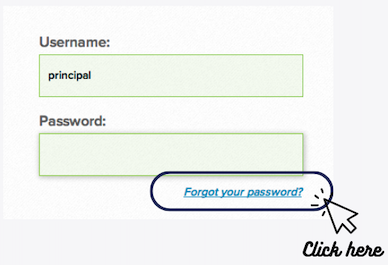
What do I do if I have forgotten my password?
On the login page, click the 鈥淔orgot your password鈥� link and follow the steps to reset.
How can parents use QuickSchools?
Once your account is setup, you will be able to:
- View your child鈥檚 attendance records
- Check grades and assignments
- Track school fees
- See homework and school announcements
For a brief video tutorial on how to use the parent portal, see this video below and click play.
How can students use QuickSchools?
Students have access to the Student Portal, where they can participate in class discussions with other students and their teachers, as well submit their homework.
What is QuickSchools?
QuickSchools is an online service that streamlines numerous management and administrative tasks for our school, ranging from attendance, to grading, to homework assignments and more. With QuickSchools, teachers and parents can access their accounts from anywhere through any device.
Where can I find manuals to learn how to use the system?
You can access the .
Is there a video tutorial?
Yes, video tutorials are available at the . Video tutorials are also available within the QuickSchools application.
Is there an app I can use?
Absolutely! QuickSchools has a mobile app available on both the (for iOS) and . It makes it easy to check grades, attendance, and messages right from your phone.